New QQ Mail VIP Member Ad Blocking Filter Rules
The new version of QQ Mail has been out for a while. Initially, folders couldn’t be sorted, and feedback was ignored.
The August update finally allowed folder sorting. But with it came overwhelming and aggressive VIP member ads. I don’t know what the operations team was thinking - desperately short of money? Cramming 9 promotional ads into one page is something only QQ Mail VIP membership can achieve!!!
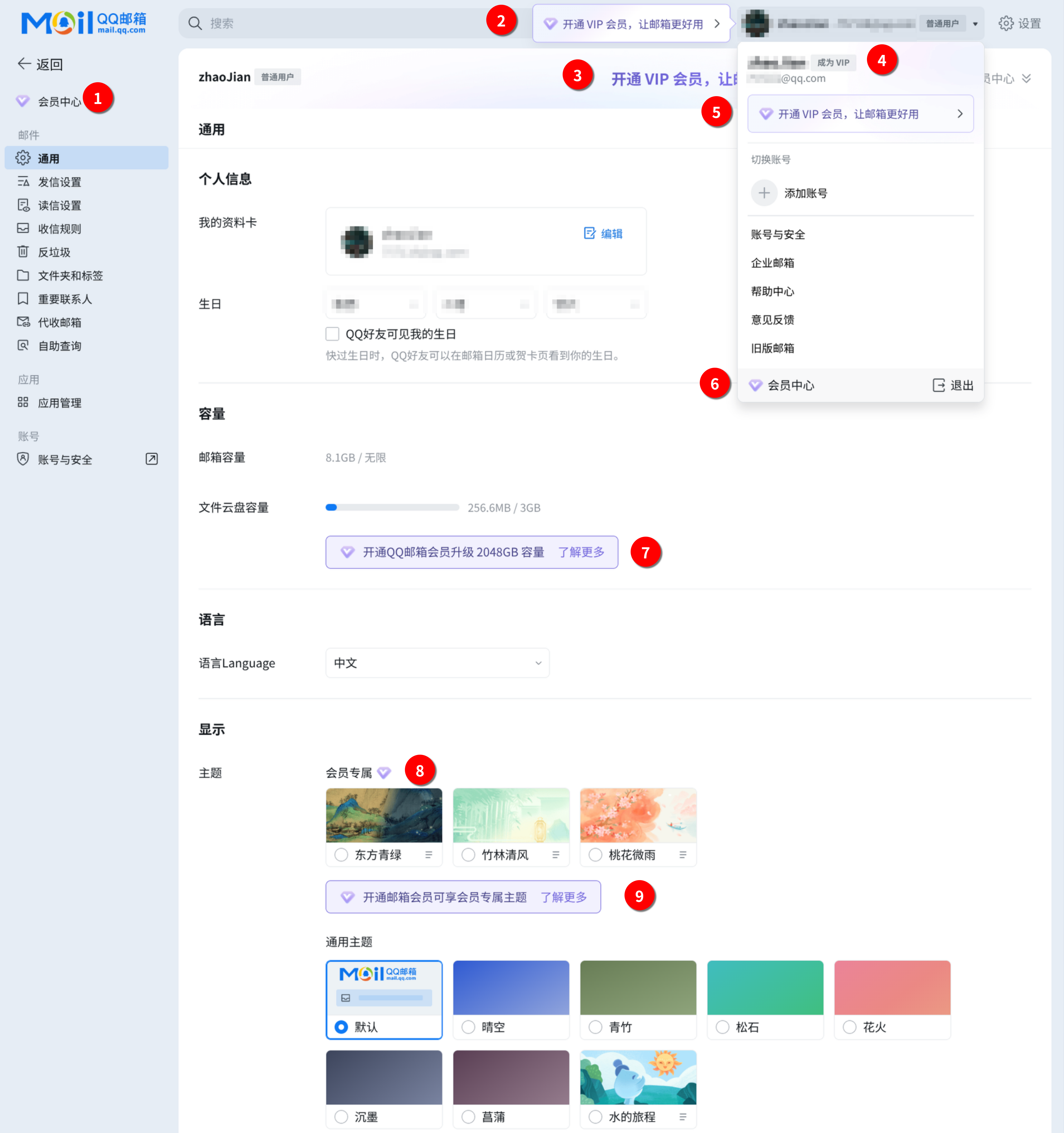
So, I created the New QQ Mail VIP Member Ad Blocking Filter Rules. Only tested on Adblock Plus and Brave, not sure if it works on others.
Disclaimer: These ad filter rules are for my personal use only, for backup when switching systems. If you see these rules, please close your eyes immediately and don’t reference them. I take no responsibility for any legal liability arising from referencing, quoting, personal use, or commercial use.
Continuously updated at: https://github.com/zhaojiannet/qq-mail-adblock
[Adblock Plus]! Title: QQ邮箱VIP广告屏蔽规则! Description: 屏蔽新版QQ邮箱中的VIP会员推广广告! Homepage: https://github.com/zhaojiannet/qq-mail-adblock! Last modified: 2025-12-25! Version: 1.0.0! License: MIT
! =====================================! 头像左侧! =====================================mail.qq.com##div.xmail-cmp-vip-float-bubble:has(.cmp-vip-float-bubble-body)mail.qq.com##div:has(span:has-text(开通 VIP 会员)):has(.cmp-vip-icon)mail.qq.com##div.cmp-vip-float-bubble-body:has-text(让邮箱更好用)
! =====================================! 头像弹出! =====================================wx.mail.qq.com##.xmail-cmp-vip-embed-bubblewx.mail.qq.com##div.xmail-ui-btn.ui-btn-size32.ui-btn-them-clear-gray.footer-btn:nth-of-type(1)wx.mail.qq.com##.vip-icon-click.vip-icon-in-panel.cmp-vip-state-icon.common-state-iconwx.mail.qq.com##.profile-user-info > .cmp-vip-state-icon.common-state-iconwx.mail.qq.com##.cmp-vip-icon-click.cmp-vip-icon-in-panel.cmp-vip-state-icon.cmp-common-state-icon
! =====================================! 应用容量! =====================================wx.mail.qq.com##div.setting-group:nth-of-type(1)wx.mail.qq.com##.content-time
! =====================================! 设置-顶部! =====================================wx.mail.qq.com##.xmail-cmp-vip-banner-common
! =====================================! 设置-容量! =====================================wx.mail.qq.com##.mail-setting-storage > div.setting-item-wrap:nth-of-type(2) > div.setting-item-row:nth-of-type(2)
! =====================================! 设置-显示主题! =====================================wx.mail.qq.com##.setting-item-wrap.mail-setting-themes > div.setting-item-row:nth-of-type(1)wx.mail.qq.com##.setting-item-wrap.mail-setting-themes > div.setting-item-row:nth-of-type(2) > .setting-theme-cardswx.mail.qq.com##.setting-item-wrap.mail-setting-themes > div.setting-item-row:nth-of-type(3)
! =====================================! 设置-发信! =====================================wx.mail.qq.com##.inactive-account-table
! =====================================! 设置-自助查询! =====================================wx.mail.qq.com##.xmail-ui-hyperlink.query-head-notewx.mail.qq.com##.xmail-ui-hyperlink.ui-hyperlink-is-inline.tab-title-vip-link
! =====================================! 设置-全局! =====================================wx.mail.qq.com##.cmp-streamer-rightCode to prevent popup from auto-closing, execute in console
setTimeout(() => { // 保存原始的 addEventListener const originalAddEventListener = EventTarget.prototype.addEventListener;
// 拦截所有新添加的 click 事件 EventTarget.prototype.addEventListener = function(type, listener, options) { if (type === 'click') { console.log('拦截了 click 事件'); return; // 不添加这个事件 } return originalAddEventListener.call(this, type, listener, options); };
// 移除页面上所有已存在的 click 事件 document.querySelectorAll('*').forEach(el => { const clone = el.cloneNode(true); if (el.parentNode) { el.parentNode.replaceChild(clone, el); } });
console.log('✓ 已禁用所有点击关闭功能');}, 3000);