Use SlimBrave Neo to disable Brave Browser's Leo AI, Rewards, Wallet and other features, and achieve the Brave Origin effect for free
Brave is an excellent browser, especially for ad blocking — it blocks all kinds of video ads directly and uses very little memory. But it also bundles features that most users rarely touch, such as Leo (AI assistant), Rewards, Wallet (Web3), VPN, Tor, News, Talk and so on.
Previously, I just turned off everything I could in Settings and tried not to trigger those unrelated features during daily use.
Recently I came across Brave Origin — essentially an officially slimmed-down version of Brave that disables the features supporting Brave’s business operations, while keeping privacy protection, ad blocking and other core daily-use features intact. The catch is that only Linux users get it for free; on other platforms you have to pay to enable it. Since I haven’t been using Linux much lately, I dug deeper. At first I looked for a Brave Origin crack or workaround, then I found SlimBrave Neo — it uses Chromium enterprise managed policies to disable telemetry, bloat and unwanted features in Brave. No browser extensions, no hacks or cracks — just Brave’s native policy mechanism, giving you the same effect as the official Brave Origin paid offering.
Installation and Usage
The steps are very simple. Take macOS as an example:
git clone https://github.com/ChaoticSi1ence/SlimBrave-Neo.gitcd SlimBrave-Neosudo python3 slimbrave-mac.py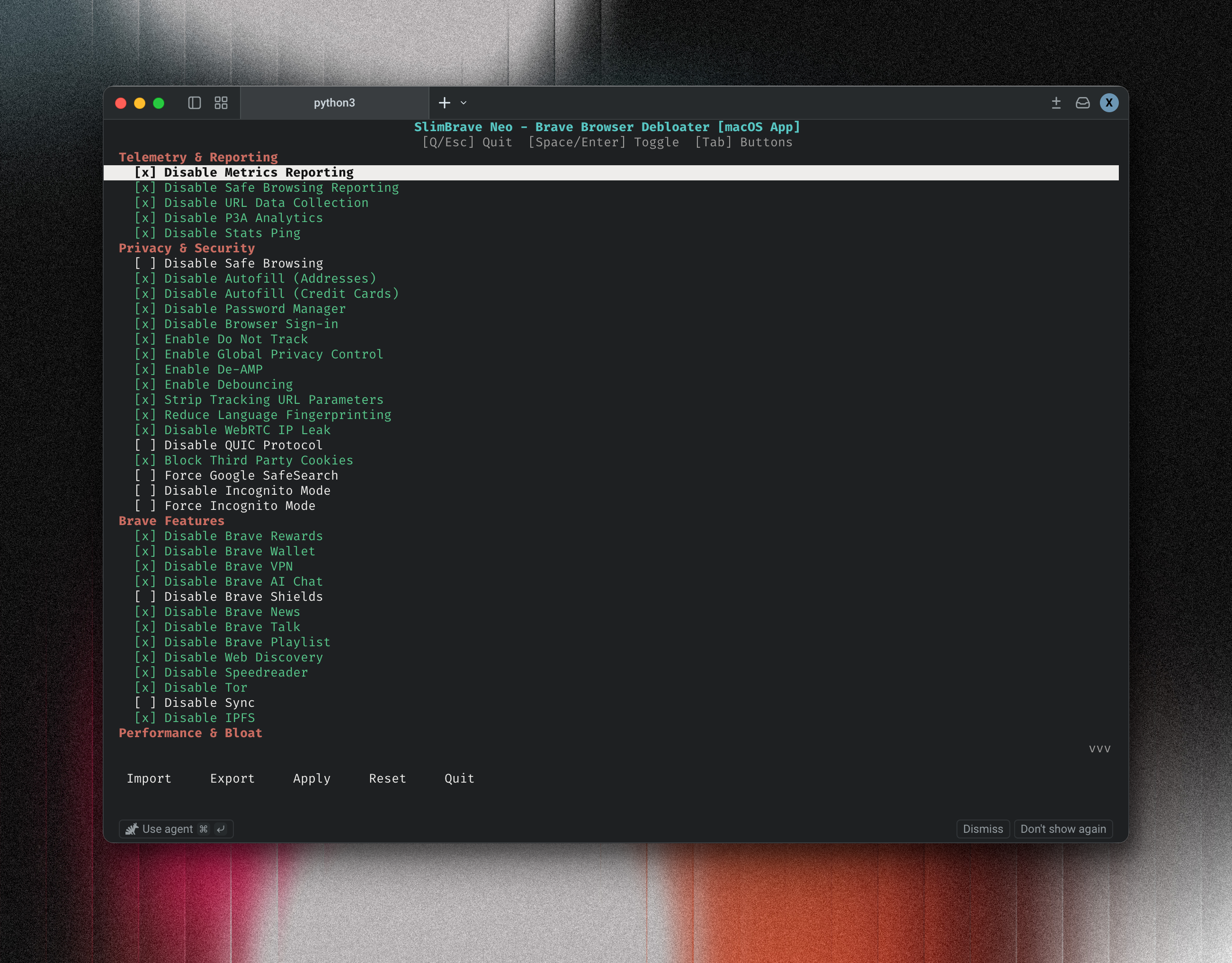
For more details, visit the SlimBrave Neo GitHub project: https://github.com/ChaoticSi1ence/SlimBrave-Neo
Features SlimBrave Neo Can Toggle
Telemetry & Reporting
- Disable Metrics Reporting
- Disable Safe Browsing Reporting
- Disable URL Data Collection
- Disable P3A Analytics
- Disable Stats Ping
Privacy & Security
- Disable Safe Browsing
- Disable Autofill (Addresses & Credit Cards)
- Disable Password Manager
- Disable Browser Sign-in
- Enable Do Not Track
- Enable Global Privacy Control
- Enable De-AMP (strip Google AMP wrappers)
- Enable Debouncing (skip known tracking redirect hops)
- Strip Tracking URL Parameters
- Reduce Language Fingerprinting
- Disable WebRTC IP Leak
- Disable QUIC Protocol
- Block Third Party Cookies
- Force Google SafeSearch
- Disable / Force Incognito Mode (mutually exclusive)
Brave Features
- Disable Brave Rewards
- Disable Brave Wallet
- Disable Brave VPN
- Disable Brave AI Chat
- Disable Brave Shields
- Disable Brave News
- Disable Brave Talk
- Disable Brave Playlist
- Disable Web Discovery
- Disable Speedreader
- Disable Tor
- Disable Sync
- Disable IPFS
Performance & Bloat
- Disable Background Mode
- Disable Shopping List
- Always Open PDF Externally
- Disable Translate
- Disable Spellcheck
- Disable Search Suggestions
- Disable Printing
- Disable Default Browser Prompt
- Disable Developer Tools
- Disable Wayback Machine
DNS Over HTTPS
- Four modes:
automatic,off,secure,custom - Custom DoH template URL support (e.g.
https://cloudflare-dns.com/dns-query) - Inline editable template field in the TUI