IT Course Computer Systems and Networks 003_Domain Names, Servers, and Cloud Services
Domain Names
A domain name refers to the name used to identify a website or network service on the internet, such as “www.baidu.com”. Domain names consist of one or more characters and follow certain rules, ending with a ”.” symbol. Domain names replace numeric IP address identifiers, making them easier for users to remember, used for accessing websites, sending emails, and other internet activities.
Domain Name Structure
Domain names typically have a hierarchical structure, from right to left:
- Top-Level Domain (TLD): The highest level classification, including generic TLDs (gTLD) like .com, .org, .net, and country code TLDs (ccTLD) like .us (USA), .jp (Japan), .cn (China).
- Second-Level Domain (SLD): For example, “baidu” in baidu.com is the second level under the TLD.
- Subdomains: Can have multiple levels, for example, tieba.baidu.com.
Domain Registration
- Anyone can register, each is unique and non-repeatable;
- Annual fees apply, first-year registration usually has discounts, pay attention to renewal prices;
- Special suffix domains require corresponding qualifications and cannot be registered arbitrarily;
- Domestic registration requires real-name verification and filing;
- Domains can be freely transferred between providers, sometimes with additional discounts;
Common Domain Registrars: Domestic: Alibaba Cloud (Wanwang), Tencent Cloud (DNSPod), Xinnet, West.cn; International: GoDaddy, NameSilo, Namecheap.
Domain Resolution
When users enter a domain name in a browser, the system converts the domain name to the corresponding IP address through domain resolution, performed via DNS. DNS is a distributed system responsible for mapping domain names to their corresponding IP addresses.
ISP DNS: China Telecom, China Mobile, China Unicom
Public DNS: Alibaba, Tencent, Baidu, 360, 114DNS, OneDNS, Cloudflare DNS, Google DNS
Private DNS, HOSTS
graph LRA[Domain \n www.zhaojian.net] -->B[DNS Server \n Resolution] -->C[IP Address \n 39.107.118.197]WHOIS Query
WHOIS is a protocol for querying domain registration information. Users can learn about specific domain registration information through WHOIS query services, including registrar, registration date, expiration date, etc.
Domain Privacy Protection
Domain privacy protection services allow domain owners to hide their personal information for privacy protection. Registrars typically provide this service, replacing the owner’s real information with proxy information provided by the registrar.
Servers
A server is a computer system (software + hardware) specifically designed to provide services or resources, providing resources and services to other computer systems. Servers typically have higher performance, reliability, and scalability. Compared to regular PCs, they can work continuously 24/7, run faster, handle higher loads, cost more, and have better configurations.
By Form Factor:
Rack-mounted, Tower, Blade
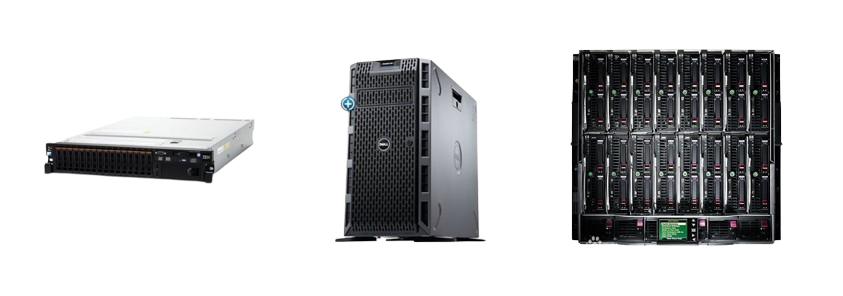
Rack-mounted servers are the most common type. They are usually installed in racks to save space and improve manageability. They look more like switches than computers, with specifications like 1U (1U=1.75 inches), 2U, 4U. Rack-mounted servers typically have high performance and scalability, suitable for applications that need to process large amounts of data or support many users.
Tower servers are another common type. They are typically placed independently rather than installed in racks. Since server motherboards have stronger expandability and more slots, they are larger than regular motherboards. Tower servers typically have lower cost and power consumption, suitable for small and medium enterprises or individual users.
Blade servers are a recently emerged type. They are highly compact and dense, saving space and improving efficiency. Blade servers typically have high performance and scalability, suitable for applications that need to process large amounts of data or support many users. Each “blade” is essentially a system motherboard.
| Feature | Rack Server | Tower Server | Blade Server |
|---|---|---|---|
| Form Factor | Installed in rack | Standalone | Installed in rack |
| Performance | High | Medium | High |
| Scalability | High | Medium | High |
| Cost | High | Low | High |
| Power Consumption | High | Low | High |
| Use Cases | Large enterprises, data centers | SMEs, individual users | Large enterprises, data centers |
By Application Type:
File servers, database servers, mail servers, web servers, FTP servers, DNS servers, proxy servers, etc.
By System Type:
Linux Servers:
-
Commercial distributions, provided by commercial companies: Ubuntu, Red Hat, SUSE
-
Community distributions, supported by free software communities: Debian, Fedora, Arch, openSUSE
-
Debian and its derivatives use the deb package format with dpkg and its frontends as package managers.
-
Red Hat and its derivatives use the rpm package format
Recommended: Debian, Ubuntu Server, CentOS, Rocky Linux, AlmaLinux
Windows Servers:
- Windows Server: 2003, 2008, 2012, 2016, 2019, 2022
Recommended: 2019, 2016, 2012 R2
Unix servers, BSD servers (OpenBSD, FreeBSD), Solaris
Recommended Cloud Service Providers
- Domestic: Alibaba Cloud, Tencent Cloud, Huawei Cloud, Baidu Cloud, Ucloud
- International: AWS Amazon, Azure Microsoft Cloud, GCP Google Cloud
- Others: Vultr, Linode, CloudCone
Links: Alibaba Cloud Tencent Cloud Huawei Cloud Amazon Google Cloud Microsoft Azure VULTR Linode) CloudCone
Assignments:
- Learn about the meanings of different domain suffixes;
- Learn about products from various cloud service providers.