Install QEMU+KVM, libvirt, Virt-Manager on EndeavourOS, Manjaro and Other Arch-based Linux
QEMU, KVM, libvirt, and Virt-Manager are key components for building virtualization solutions. They each play different roles but work together to provide powerful virtualization capabilities.
QEMU is an open-source general-purpose hardware emulator and virtual machine manager. It can run as a pure emulator (lower performance) or combine with KVM to provide hardware-accelerated virtualization (higher performance, comparable to bare metal).
KVM is a module in the Linux kernel that runs directly on the Linux kernel. With hardware virtualization technology, it can achieve performance close to native hardware.
libvirt is an open-source API and toolset for managing virtualization platforms (such as QEMU/KVM, Xen, VMware, Hyper-V, etc.).
Virt-Manager is a graphical interface management tool that doesn’t directly manage virtual machines itself, but is specifically designed to manage virtual machines provided by libvirt. It’s mainly aimed at users who are not familiar with the command line, providing a convenient graphical interface.
KVM comes with the Linux kernel and achieves high-performance virtualization when integrated with QEMU. libvirt simplifies QEMU’s complexity and provides command-line management functions, making it the core tool for virtualization management. Virt-Manager is the graphical interface for libvirt, suitable for users who need a GUI to manage virtual machines more conveniently.
Install Components Required for Virtual Machine Operation
yay -S qemu virt-manager virt-viewer dnsmasq vde2 bridge-utils openbsd-netcat ebtables swtpm
sudo systemctl enable libvirtd.servicesudo systemctl start libvirtd.service
sudo usermod -aG libvirt $USER-
qemu is a general-purpose open-source virtual machine and emulator. It allows you to run other operating systems within one operating system, supporting full system virtualization and process emulation.
-
virt-manager is a graphical virtual machine management tool that simplifies the creation, management, and monitoring of virtual machines.
-
virt-viewer is a lightweight remote viewing tool that allows connecting to the graphical console of virtual machines (via SPICE or VNC protocol).
-
dnsmasq is a lightweight DNS and DHCP server. Libvirt uses it to provide NAT network connections for virtual machines (default setting).
-
vde2 is a virtual switch used to create virtual network environments. It’s an optional tool, mainly for advanced virtual network configuration, suitable for users who need complex network topologies.
-
bridge-utils provides bridged network management tools for bridging virtual machine network interfaces to physical network interfaces. This is required if you need virtual machines to directly access external networks (bridge mode).
-
openbsd-netcat is a tool for network debugging and data transmission, supporting TCP and UDP protocols. Libvirt uses it for some network-related tasks (e.g., data transfer between remote hosts).
-
ebtables is a user-space tool for managing Linux kernel bridge filter tables. It’s needed when managing virtual machine network traffic rules in bridged networks.
-
swtpm is a software-emulated TPM that allows virtual machines to use TPM functionality without physical hardware support. It supports Windows 11 or other application scenarios that require TPM.
Enable Clipboard Sharing and File Drag-and-Drop in QEMU and virt-manager
yay -S spice-vdagent qemu-guest-agentsudo pacman -S spice-vdagent qemu-guest-agent- spice-vdagent is mainly used to enhance user experience, providing clipboard sharing, file drag-and-drop, and other features.
- qemu-guest-agent provides management and communication capabilities between the virtual machine and the host, allowing the virtual machine to perform more efficient operations and management tasks.
After installation, you need to configure the virtual machine in virt-manager (Linux host side)
- Display Protocol Spice Spice Server - Type: Spice server
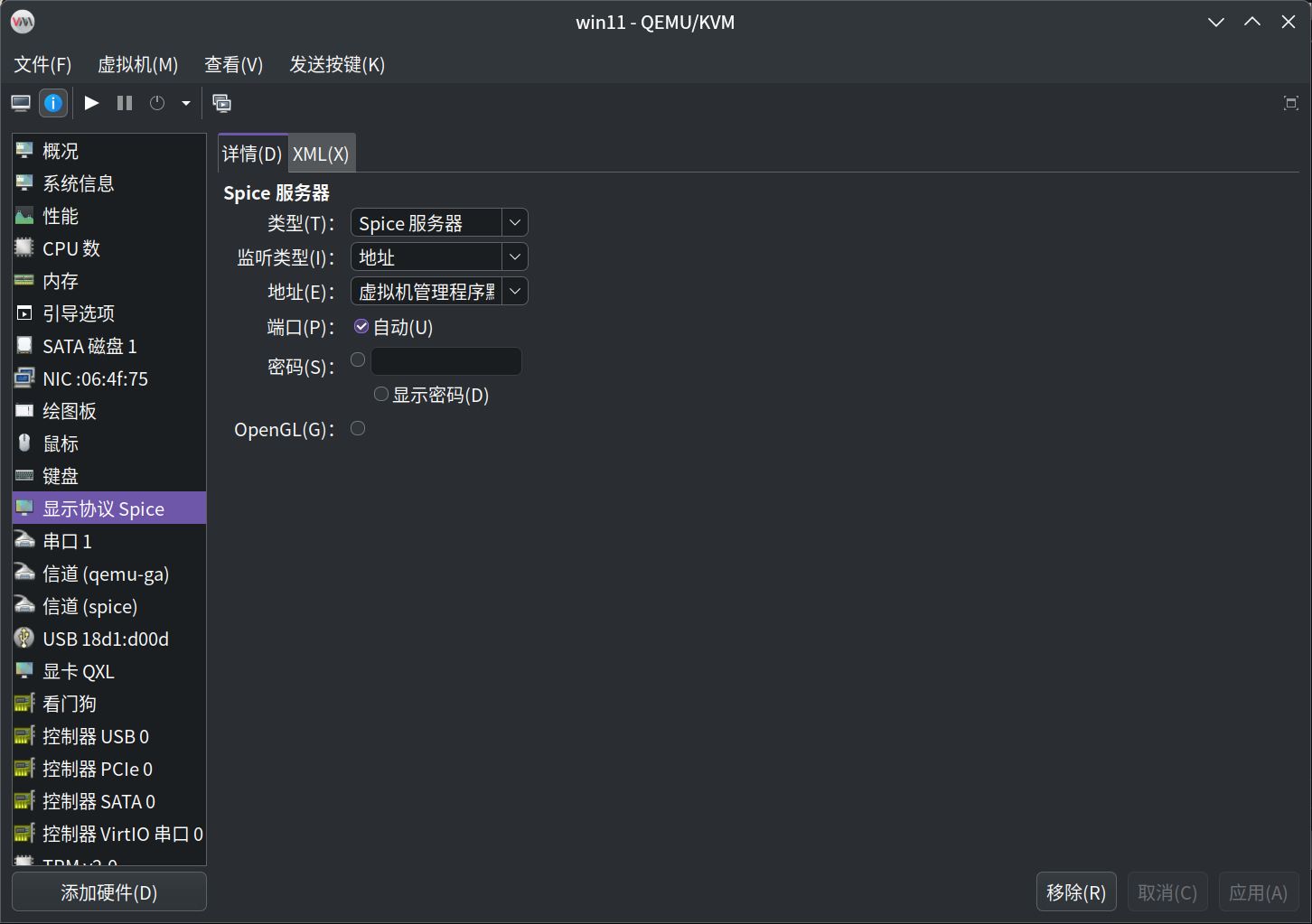
- Add Hardware (two): Channel: Select com.redhat.spice.0 Channel: Select org.qemu.guest_agent.0
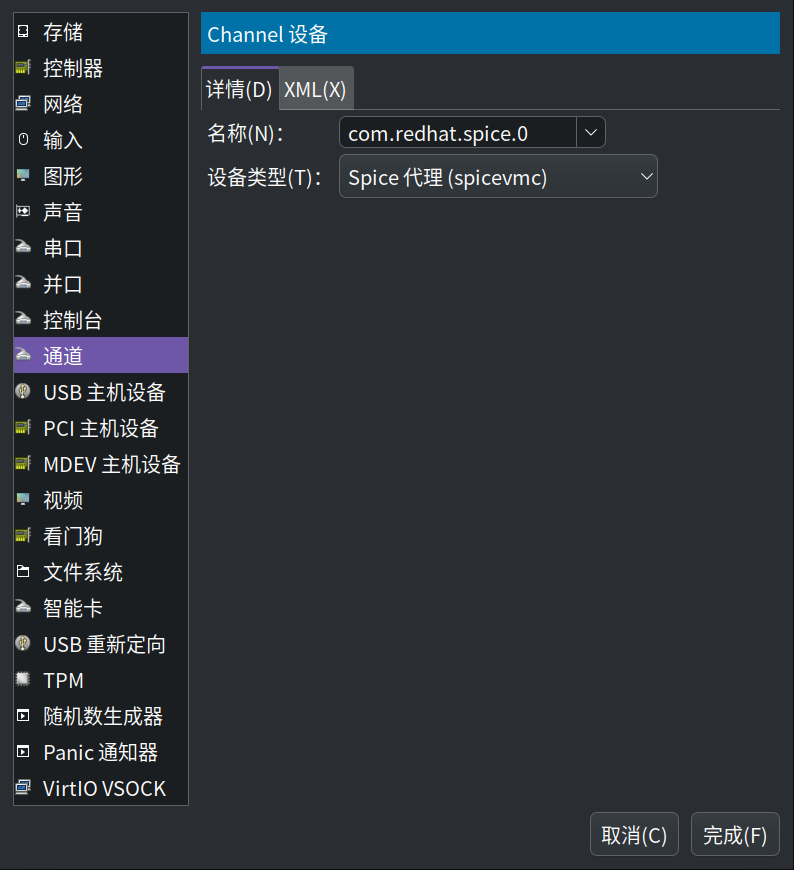
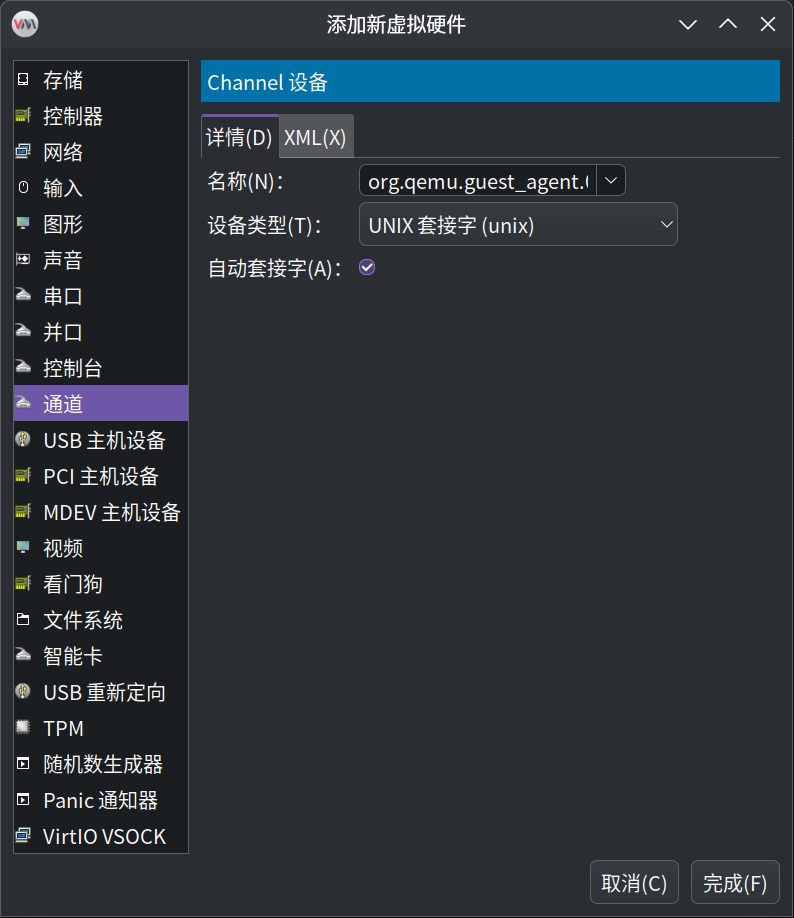
Install Spice Guest Tools inside the virtual machine (guest, the installed virtual machine system) to enable clipboard sharing, file drag-and-drop, and other features.
If you encounter “Error starting domain: Requested operation is invalid: network ‘default’ is not active” when running, you need to start the default network.
Start the default network
sudo virsh net-start defaultSet to auto-start on boot
sudo virsh net-autostart default