IT Course Computer Systems and Networks 005_Virtualization
Virtualization
Virtualization technology refers to the process of dividing the hardware resources of a single physical computer into multiple independent virtual machines (VMs). Each VM runs its own operating system and applications, as if it were a separate physical computer.
Virtualization technology has many benefits, including:
- Improved resource utilization: Virtualization allows you to run multiple VMs on a single physical computer, thereby improving resource utilization. For example, you can use a single physical computer to run multiple virtual servers, thereby improving server utilization.
- Reduced costs: Virtualization can help you reduce IT costs because you can use fewer physical computers to run the same number of applications. For example, you can use virtualization technology to deploy desktop virtualization, providing employees with more flexible work options.
- Increased flexibility: Virtualization can help you deploy and manage applications more flexibly. You can create and delete VMs as needed and move VMs to different physical computers. For example, you can use virtualization technology to create test environments for testing before deploying new applications.
- Improved security: Virtualization can help you improve security because each VM runs in its own isolated environment. For example, you can use virtualization technology to create isolated environments to run sensitive applications.
Common types of virtualization technology:
| Virtualization Type | Features | Examples |
|---|---|---|
| Full Virtualization | Uses a hypervisor to create multiple virtual machines on physical hardware, each VM running a complete operating system. | VMware vSphere/ESXi, Microsoft Hyper-V, KVM |
| Containerization | Uses container technology to package applications and their dependencies into independent containers that share the host OS kernel. | Docker, Kubernetes, OpenShift |
| Hardware-assisted Virtualization | Leverages hardware virtualization support like Intel VT-x and AMD-V to improve VM performance and efficiency. | VMware ESXi, KVM (with hardware virtualization support) |
| Network Virtualization | Creates virtual networks at the network layer, allowing multiple virtual networks to share the same physical network infrastructure. | VMware NSX, OpenStack Neutron |
| Storage Virtualization | Abstracts and centrally manages storage resources, making them transparent to applications, improving storage resource utilization and flexibility. | VMware vSAN, Storage Area Network (SAN) Virtualization |
| Desktop Virtualization | Virtualizes desktop operating systems and applications, allowing users to access virtual desktops over the network. | VMware Horizon, Citrix Virtual Apps and Desktops |
| Application Virtualization | Packages applications and their dependencies into independent virtual containers, enabling them to run in different environments. | Docker, Microsoft App-V |
Virtualization technology is widely used in many industries, including:
- Data Centers: Virtualization is a key technology in data centers, helping to improve resource utilization, reduce costs, and increase flexibility.
- Cloud Computing: Cloud computing is based on virtualization, and cloud service providers use virtualization technology to create and manage cloud services.
- Desktop Virtualization: Desktop virtualization allows users to access their desktop environments through remote connections.
- Mobile Virtualization: Mobile virtualization allows users to run virtual applications on mobile devices.
We mainly use it for development, testing, and debugging environments
Common virtualization software:
| Virtualization Software | Type | Features | Use Cases |
|---|---|---|---|
| VMware vSphere / ESXi | Hypervisor | Provides comprehensive virtualization solutions including server, network, and storage virtualization. | Enterprise virtualization |
| Microsoft Hyper-V | Hypervisor | Part of Windows Server, supports Windows and Linux virtual machines. | Windows environment virtualization |
| KVM | Hypervisor | Linux kernel-based virtualization technology, supports hardware virtualization and containerization. | Linux server virtualization |
| Xen | Hypervisor | Open-source virtualization platform with hardware-assisted virtualization support, providing strong performance. | Server virtualization, cloud computing environments |
| Oracle VM VirtualBox | Hypervisor | Free open-source virtualization software supporting multiple operating systems, suitable for personal users and development environments. | Development and testing environments, personal users |
| VMware Workstation Pro | Hypervisor | Desktop-level virtualization software supporting Windows and Linux, suitable for personal users and developers. | Development, testing, multi-platform application deployment |
| Docker | Containerization Platform | Provides lightweight, portable containerization platform with applications and dependencies packaged in containers. | Rapid deployment, continuous integration, microservices architecture |
| Kubernetes | Container Orchestration and Management Platform | Open-source container orchestration and management platform for automating application deployment, scaling, and operations. | Large-scale, distributed containerized applications |
| OpenShift | Containerization Platform | Kubernetes-based containerization platform with enterprise features including building, deploying, and scaling applications. | Enterprise containerized application management |
| rkt | Container Engine | Container engine from CoreOS emphasizing security and simplicity. | Lightweight, fast, secure container runtime |
Full virtualization software comparison:
Feature/Software | VMware vSphere/ESXi | Microsoft Hyper-V | KVM | Xen | VirtualBox | VMware Workstation | QEMU |
|---|---|---|---|---|---|---|---|
| Company | VMware | Microsoft | Linux Open Source Community | Xen Project | Oracle | VMware | QEMU |
| Type | Full Virtualization | Full Virtualization | Full Virtualization | Full Virtualization | Full Virtualization | Full Virtualization | Full Virtualization |
| Supported OS | Multiple | Windows/Linux | Multiple | Multiple | Multiple | Multiple | Multiple |
| Management Tools | vCenter | Hyper-V Manager | Virt Manager, oVirt | XenCenter | VirtualBox GUI | VMware Workstation GUI | QEMU CLI, Virt Manager |
| Performance | High | Medium | High | High | Medium-High | Medium-High | Medium |
| Community Support | Large community | Large community | Large Linux community | Large community | Large community | Large community | Large community |
| Commercial Support | Available | Available | Usually depends on Linux distribution vendor | Available | Available | Available | Available |
| Virtual Network Support | Rich | Limited | Rich | Limited | Limited | Limited | Limited |
Containerization software comparison:
Feature/Software | Docker | Kubernetes | OpenShift |
|---|---|---|---|
| Company | Docker, Inc. | Cloud Native Computing Foundation (CNCF) | Red Hat |
| Type | Containerization | Container Orchestration | Container Orchestration + Developer Tools |
| Management Tools | Docker CLI, Docker Compose | kubectl | OpenShift CLI, Web Console |
| Auto Scaling | Yes | Yes | Yes |
| Service Discovery | Yes | Yes | Yes |
| Community Support | Large community | Large community | Large community |
| Commercial Support | Available | Available | Available |
| Container Orchestration | Swarm | Kubernetes | Kubernetes |
Links:
VMware Workstation Workstation 17 Pro for Windows Workstation 17 Pro for Linux MC60H-DWHD5-H80U9-6V85M-8280D
VMware Fusion Fusion 13 Pro for macOS 12+ 4A4RR-813DK-M81A9-4U35H-06KND
Parallels Desktop Cracked Version
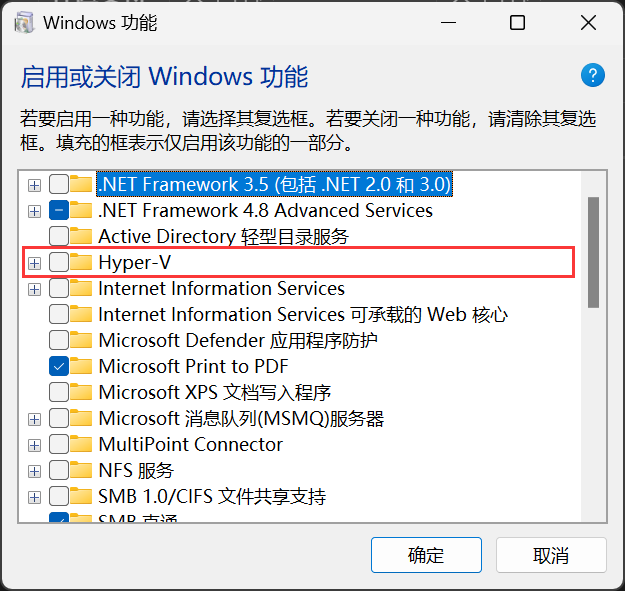
Hyper-V System search (Win key + R): Turn Windows features on or off, check Hyper-V, restart.